












The source of every lead
Every lead arrives with its source and the campaign it came from, so you can see which channel brings real opportunities, not only numbers.
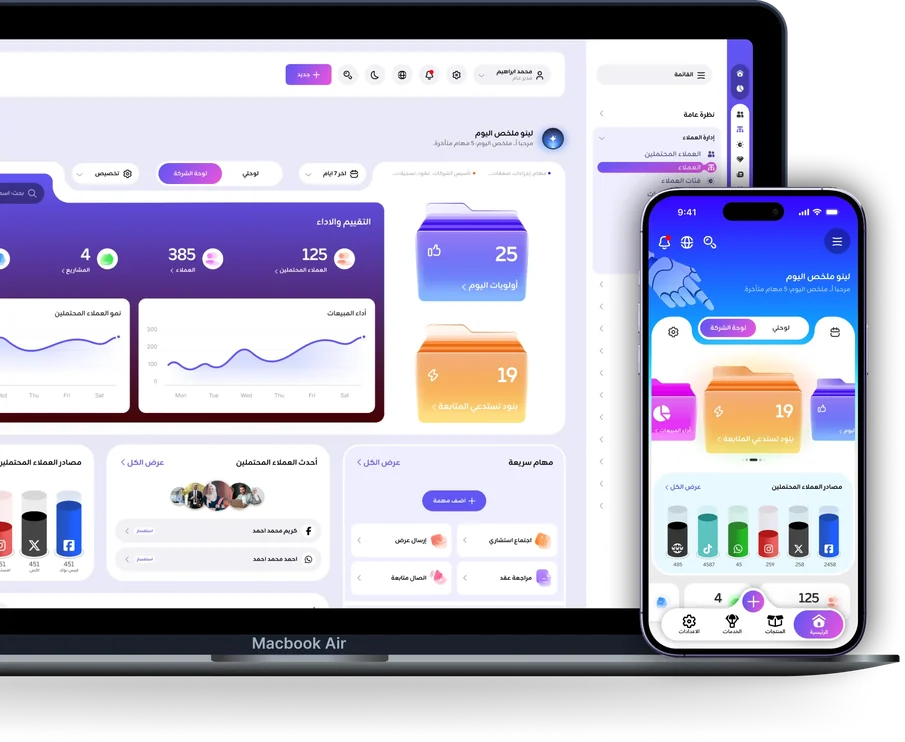
LINECRM brings customer conversations from supported channels into one place and helps your team manage leads and sales opportunities from the first inquiry through the sale and beyond. Review campaign and creative performance using the data and integrations available, so you can better understand what is driving results.
With LINECRM, organize customer data, follow sales opportunities, and use the available data to assess results.
Every lead arrives with its source and the campaign it came from, so you can see which channel brings real opportunities, not only numbers.

Track each opportunity as it moves through the sales stages to the close, and judge campaigns by the deals they reach rather than by lead volume alone.

From the first conversation to a closed deal and post sale support, organize the customer journey in LINECRM. Your team sees each opportunity’s status, who is responsible for it, and what to do next.
LINECRM helps you manage the customer journey more efficiently. From the first conversation and lead capture through deal follow up and post sale support, it gives your team tools to organize customer data, manage sales opportunities, and review sales and marketing performance in one system.

Bring conversations from supported channels into the Unified Inbox, so your team replies from one screen.

Track each opportunity’s source, status, and owner, with leads assigned to your team automatically.

Organize sales stages in the Sales Pipeline, each stage with its win probability and every lost deal with its reason.

Review campaign and creative performance based on available data, from the lead to the deal.

Track opportunity assignments and performance indicators, such as first reply speed and each salesperson’s results.

Review lead and deal data, including conversion rates and loss reasons.
Access available interaction history, from conversations and calls to contracts and payments, to support post sale follow up.

Your inbox, customers, tasks and calls wherever you are, with a notification for every new customer message.
Available features and integrations depend on system configuration and enabled modules.
Follow customer conversations from supported channels through one LINECRM interface. Review past conversations and continue each interaction with clearer context, depending on the integrations and system configuration.
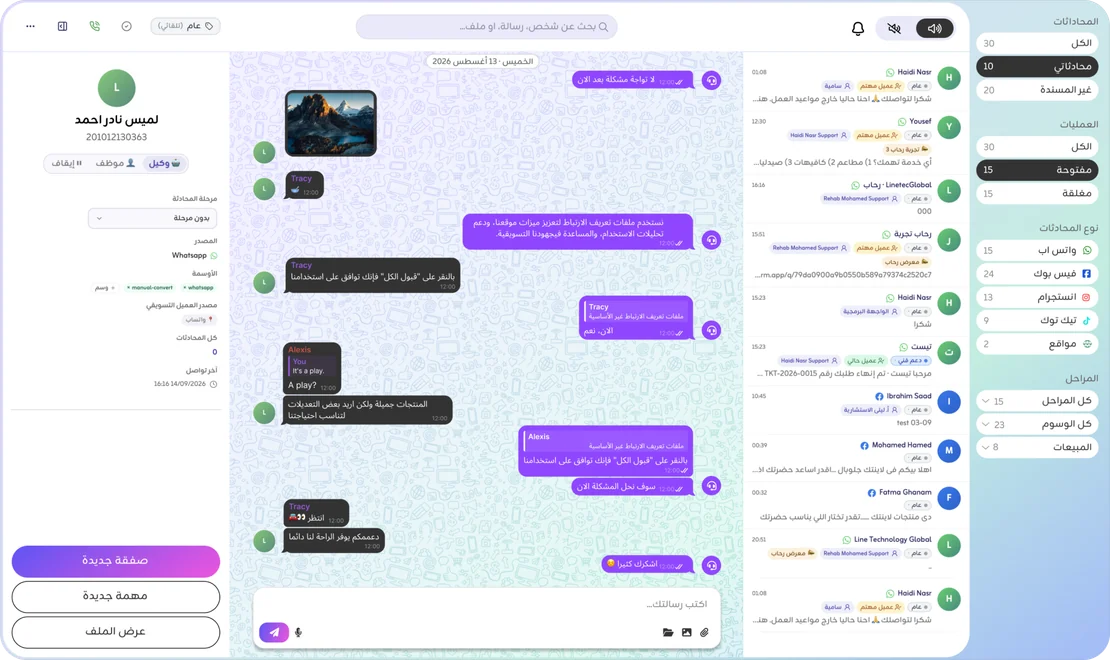
WhatsApp through Meta’s official API, plus Messenger, Instagram, TikTok, email and website chat, each as it is connected.
Every new conversation reaches the person responsible with a mobile notification, and the first response time of each employee is measured.
The customer’s record sits beside the conversation, so anyone on the team continues from the last point without asking again.
Organize lead data and track each opportunity’s source, status, and owner from the first inquiry through the closed deal in LINECRM.
Move deals between stages. Each stage has its type and win probability, and a lost deal is never saved without its reason.
See when an opportunity entered its stage and when it was last contacted, so you notice what is stalling before you lose it.
Scheduled tasks and reminders on every opportunity, so your team knows what to do next.
The LINECRM Marketing module helps you track lead sources, compare campaign and creative performance, and connect customer data with sales stages and recorded outcomes, based on available integrations.
The ads reports are add on modules enabled per company, for Meta ad accounts, and for Google and Snapchat as they become available; they only read your data and change nothing in your campaigns. The source and campaign of every lead are recorded for every company.
LINECRM reports and dashboards help you track lead assignments, review sales stages and open deals, and see team performance indicators in one place. Identify opportunities that need follow up and make decisions using the data available to you.
Review lead distribution and team responsibilities.
Track Sales Pipeline stages and open deals.
View sales team performance indicators.
Review campaign and creative results based on enabled data and integrations.
The customer journey does not end at the sale. Customers may need follow up, service, or additional information. With LINECRM, your team can return to the available customer data and interaction history and continue from the last point of contact, helping keep follow up organized and the relationship active.

Calls, messages, notes and edits in one timeline on the customer’s record.

The customer’s conversations on connected channels, for those whose permissions allow it.

Support tickets, each with its service level, and a public form the customer can send a request from.

The quotations, contracts and invoices linked to the customer, each in its own tab.

The instalment plan, its due dates and the payments recorded, wherever your business uses them.
From the first lead through post sale service, make customer details and available communication history accessible to your team according to system permissions.
Explore the communication channels and integrations available with LINECRM, and learn how to configure them for your team’s needs and the way your company manages the customer journey.
Platforms we work with
Integration features and setup requirements vary by channel and account configuration.
Connecting an external service is optional, and is done by the user from LINECRM’s settings. Each service asks only for the permissions its feature needs:
LINECRM does not sell this data, does not use it for advertising, and does not use it to train AI models, and you can disconnect any service at any time. LINECRM’s use of Google user data adheres to the Google API Services User Data Policy, including the Limited Use requirements.
Read the full details in our Privacy PolicyWhether you manage a real estate company, a clinic, or a tourism business, LINECRM helps you organize customer data, manage sales opportunities, and communicate with customers in a way that fits your business.
Track leads from the first inquiry through property viewings, reservations, and contracts, with projects, units, an availability board and payment plans.
Organize service inquiries and appointments, and manage communication before visits and after service, with patient files, practitioner schedules and insurance claims.
Bring inquiries from supported channels together and organize sales opportunities, with vehicle inventory, trade ins, finance quotes and test drives.
Track inquiries about courses and programs through registration and booking confirmation, with guardians, class timetables, assessments and check in.
Organize product inquiries and post sale support requests, with orders, returns, loyalty points and a product catalogue.
Bring customer conversations and details together and organize follow up responsibilities, with matters, deadlines and timesheets.
Organize project inquiries and prospective customers, and track conversations, proposals, meetings, and the owner of each opportunity.
Track inquiries from retailers and business customers, and organize sales opportunities, negotiations, and follow up across the sales team.
Organize travel and booking inquiries through confirmation and post service follow up, with itineraries, departures, suppliers and passport and visa expiry alerts.
Follow prospective members to the subscription, with membership packages you can freeze and renew, a class timetable and QR check in.
Leases with rent invoices and renewals, and for short stays a unit calendar, pricing rules, bookings and a public booking page.
Tenders, sites, a device register and installations, with maintenance tickets, a dispatch board, purchase orders and warranties.
Parcels and delivery attempts, couriers and the cash each one collects, zones and rates, and a public tracking page for your customers.
Orders recorded with their channel, a kitchen screen, the menu and branches, and riders with the cash they carry.
Subscriptions, renewals and monthly recurring revenue, with training and installation orders, their sessions, hours and a signed handover.
For the accounting program, website, application or support desk you build: your system sends and receives WhatsApp messages through LINECRM, and your company runs it all from its own integration portal, with no CRM screens.

Your system sends a purpose name, such as an invoice, a statement or a payment reminder, with its values, and the platform picks the approved template bound to it. A new template later changes the binding, not your code.

Create templates in the portal or from your own system. The platform checks them against Meta’s rules before they go to review, and the portal shows each template’s status at Meta.

Connect a new number through Meta’s embedded signup or move yours from another provider, and add more numbers as your package allows. Meta’s message fees are paid from your own Meta account.

Your system is told of every incoming message, every delivery, read and failure, and every finished broadcast, signed with a secret. An event that cannot be delivered is sent again up to nine times over about two days.
Each key carries the scopes you choose. A test key runs every check of a send, then simulates it and its events without a real message leaving, so your developer builds the receiving side before going live.

Send one template to up to 1,000 recipients in one request, now or at a time within 30 days, follow the month’s messages against your package, and receive an alert at 80 and 100 percent.
The Linetec Global team works with your developers from opening the account to the first message.
Talk to us and we open an integration platform account for your company, on the package that fits your message volume.
From the WhatsApp number tab of the portal, while the “Start here” list ticks off each step you complete.
Create your templates, bind each one to a purpose, and finish your setup while Meta reviews them.
Your developer builds the integration with a test key and the documentation inside the portal, in their language.
With a live key, the portal shows the month’s usage and your invoices, and your account can later become a full CRM.
The platform makes the code, sends it through your company’s approved authentication template and checks it when the customer types it back, so your system never creates or stores a code.
The send returns the code’s id and expiry, never the code itself. The check answers valid, or gives the reason: a wrong code with the attempts left, expired, or already used.
Only a hash of the code is kept. Each code works once with five attempts, a new code closes the earlier ones, and a number receives at most five codes in ten minutes and one every thirty seconds.
The code arrives in Meta’s authentication format with a button that copies it. You create the template from the portal or from your system and choose its language and its validity, from 1 to 90 minutes.
Choose a length of 4 to 8 digits, 6 by default. The code expires after the minutes the template states, or after ten when it states none.

The verification codes tab of the portal sends a real code to your number and checks what you type, and a test key simulates the send with a code of zeros.
The copy of the message in the conversation keeps stars where the code was, so the code never shows in the message history. The message counts in your monthly usage as authentication.
From asking for a code to the answer, in four steps.
It sends the customer’s number to the platform and keeps the code id it gets back.
In an authentication message from your company’s number, with a button that copies the code.
Your app sends the id and the typed code to the verify request.
Valid, or not valid with the reason, so your app completes the sign up or sign in, or asks for a new code.
Quick answers about LINECRM for companies.
LINECRM can support businesses across different industries, depending on their customer management, communication, and sales needs, and fourteen industries have their own ready setup with their screens and terms. Book a Zoom meeting to discuss your business and see how LINECRM may fit your requirements.
You can follow conversations from channels connected to and supported by LINECRM through the Unified Inbox. Available channels and features depend on enabled integrations and account configuration.
The Marketing module lets you review campaign and creative data and lead sources, and connect them with recorded sales outcomes, based on the data and integrations available in your system configuration.
LINECRM helps your team access available customer data and interaction history and continue communication after the deal through channels connected to the system, with support tickets and a service level for each.
No. LINECRM supports direct connections to supported platforms, without requiring an additional intermediary tool.
Yes. LINECRM connects your company number through Meta’s official WhatsApp Business API, so you send and receive messages, approved templates and campaigns from inside the system, and every conversation sits on its customer’s record.
Yes. The LINECRM app for Android and iOS shows your inbox, customers, deals and tasks, and notifies you of every new customer message.
Each company’s data is kept apart from every other company’s, the connection is encrypted, permissions decide what each employee sees, and an encrypted backup is kept. LINECRM does not sell your data or use it for advertising.
Yes. The LINECRM integration platform lets an accounting program, a website, an application or a support desk send and receive WhatsApp messages through an API: sending by purpose, approved templates and broadcasts, with signed webhooks, scoped keys and test keys, its own portal and documentation in its language. The company pays Meta’s message fees from its own Meta account, and our team opens the account and works with its developers up to the first message.
Yes. The platform makes the code, sends it through a Meta approved authentication template with a button that copies it, and checks it when the customer types it back. The code never comes back to your system and only its hash is kept; it works once, allows five attempts and expires after the minutes the template sets.
Linetec Global serves companies in Egypt, Saudi Arabia and the United Arab Emirates, with setup, channel connection and team training. Reach us on WhatsApp at +20 106 760 0069 in Egypt, +966 920018094 in Saudi Arabia and +971 54 346 6461 in the UAE.
Bring customer conversations into one unified inbox, organize lead and deal follow up, and review the reports available in LINECRM.
Book a Zoom meeting with the Linetec Global team to discuss your needs and learn about the system capabilities and integrations that may suit your business.